
Evidence capture
When Kestrel suspects data theft, it keeps evidence on the PC so you can see exactly what was taken. The capture starts on an ST-02 alert (a program touched many kinds of secrets) or an ST-04 alert (a program read secrets and then uploaded data), in any mode, Audit included, and also while protection is turned off in detection only mode. Capturing changes nothing on the PC.
It covers one process tree: the alerting process, the processes it started, and the loaders that started it from user folders (it stops at the first parent in Windows or Program Files, so explorer.exe is not included). A second alert for the same tree within 10 minutes joins the same bundle.
What a bundle contains
Each part can be turned off per policy (see Policies).
| Part | What it is | Limits |
|---|---|---|
| Staged files | Copies of the new files the processes created in the signed-in user's own profile, ProgramData and Temp during the window (stealers pack their loot there before uploading it). Files overwritten or appended in place are not seen. Outside the user's own profile, only files the sensor saw the processes create are copied. Files in other users' profiles and in Windows' secret folders (machine keys, SSH host keys, service accounts' profiles, setup answer files, crash dumps, the paging file) are listed but never copied. | 50 MB per file, 200 MB and 500 files in total |
| List of secrets read | Which credential stores were opened (browser passwords and cookies, wallets, Telegram, Discord, FTP and cloud credentials), when and how often. | Metadata only |
| Copies of secrets | Copies of those credential stores, as they were at the end of the window. They contain the employee's real passwords and cookies. Only stores in the user's own profile are copied; a store elsewhere (a shared password database, a VPN profile in Program Files) is listed but not copied, because Kestrel cannot tell whether the program was actually allowed to read it. | 50 MB per store, 100 MB in total |
| Connection capture | 60 seconds of the processes' network traffic, recorded with Windows' built-in pktmon (Windows 10 version 2004 or later), as capture.pcapng. | 50 MB, oldest packets overwritten |
Copies are taken at the end of the window (the alert plus 60 seconds). Kestrel opens the originals read-only without blocking the program that owns them, never follows junctions or symbolic links, refuses hard-linked files and skips its own folders. It decides what may be copied on the real location of each file (short PROGRA~1 style names are expanded first and checked again on the opened file), and "the user's own profile" is the profile folder Windows records for that account, not a folder that merely starts with the same name.
The bundle is encrypted on the PC (AES-256-GCM, per-PC key protected by Windows DPAPI). Only the list of contents, filtered by the device's privacy settings, reaches the server automatically.
The panel on the incident page
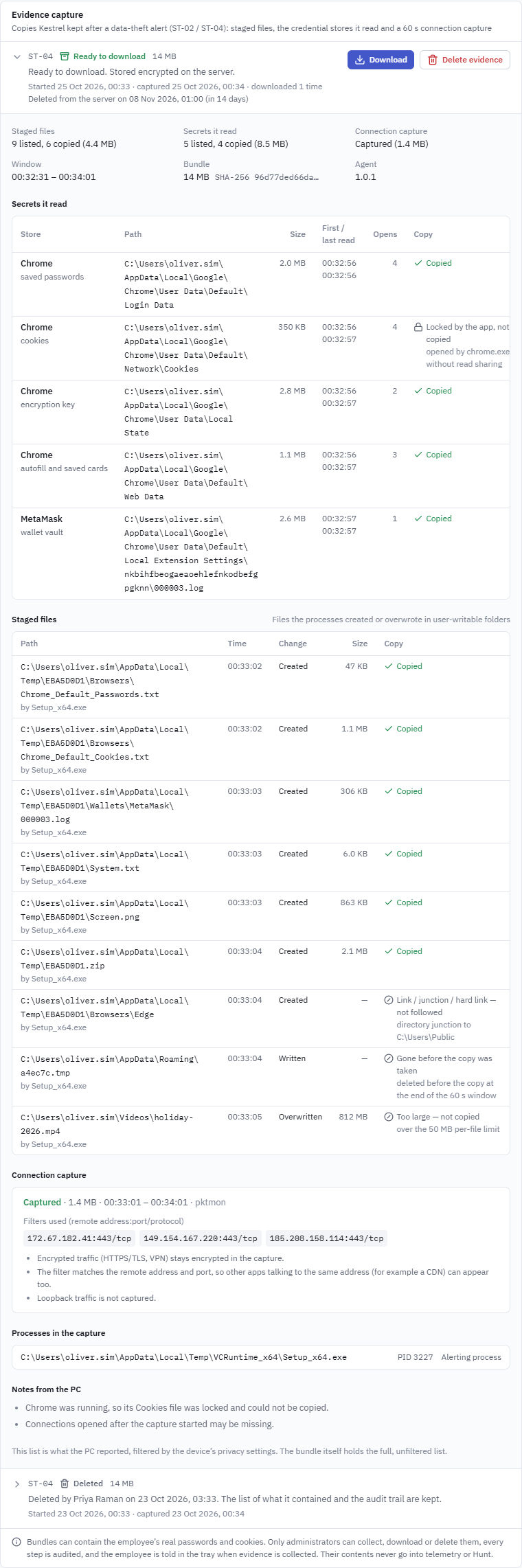
Incidents with a bundle show an Evidence capture card below the alerts, timeline and evidence tabs. Every role that can read incidents sees the status, times, size, retention and the list of contents. Only administrators can collect, download or delete; for other roles these buttons are disabled with the tooltip "Administrators only".
| Status | Meaning | What you can do |
|---|---|---|
| Capturing | The PC is copying staged files and recording connections for 60 s after the alert. | Wait |
| On the PC | Ready on the PC, not uploaded. Kept there, encrypted, until it is collected or its retention ends. | Collect evidence, Delete evidence |
| Collecting | An administrator asked for it. Queued until the PC is online, then uploading. | Delete evidence |
| Ready to download | Stored encrypted on the server. | Download, Delete evidence |
| Capture failed | The PC could not build the bundle; the reason is shown. | Nothing |
| Expired | Deleted after the retention period (on the PC or the server). | Nothing |
| Deleted | Deleted by an administrator; the panel shows who and when. | Nothing |
The header of each bundle shows the rule, the status (icon and label), when the capture started and finished, the size and when it will be deleted ("Deleted from the PC on ..." or "Deleted from the server on ...").
Expand a bundle to see its list of contents:
- Summary: staged files listed and copied, secrets listed and copied, capture status, with sizes.
- Secrets it read: store, what it holds, path, size, first and last read, how many times it was opened, and whether it was copied. "Locked by the app, not copied" means the browser held the file open without read sharing (Chrome and Edge do this for
Cookieswhile they run). - Staged files: path, time, kind of change, size and copy status. Files that were not copied say why, for example "Link / junction / hard link, not followed", "Kestrel's own file, skipped", "Too large", "the bundle reached its size limit" or "Gone before the copy was taken", "Another user's profile, not collected", "outside the user's own profile and not created by the program as far as the sensor saw" or "Cloud placeholder not downloaded, not collected".
- Connection capture: status, the filters used (
ip:port/protocol) and size. - Processes in the capture and notes from the PC.
Paths and names come from the endpoint, so the console shows them as plain text with invisible direction-changing characters removed.
Limits of the connection capture
- Encrypted traffic (HTTPS/TLS, VPN) stays encrypted in the capture. You see where data went and how much, not what it was.
- The filter matches the remote address and port, so other apps talking to the same address (for example a CDN) can appear too.
- Loopback traffic is not captured.
- Connections the tree opens after the capture started can be missing.
- If another
pktmoncapture is already running on the PC, Kestrel does not take it over and records "Not captured".
Collect evidence
Collect evidence asks the PC to upload the bundle. A confirmation explains what you are about to receive:
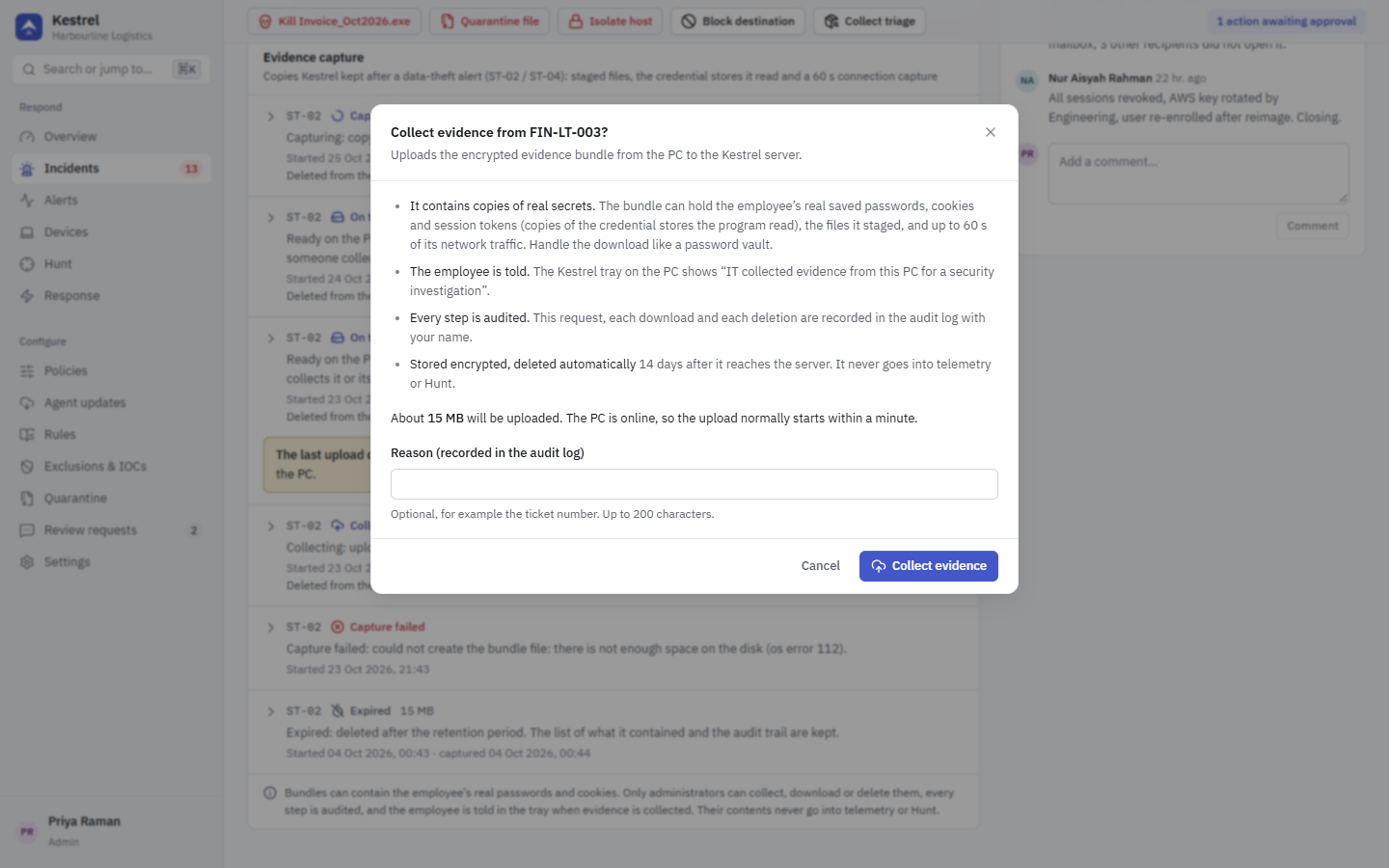
- The bundle can hold the employee's real saved passwords, cookies and session tokens, the files the program staged and up to 60 s of its traffic.
- The employee is told: the Kestrel tray shows "IT collected evidence from this PC for a security investigation".
- The request, each download and each deletion are recorded in the audit log.
- The server stores it encrypted and deletes it automatically after the evidence retention period.
If the PC is offline, the request is queued and the upload starts when it is next online. If an upload stops (for example the laptop went to sleep), the bundle stays on the PC and the panel shows the error with Try again. Agents older than evidence capture cannot upload; the button is disabled and says so.
Download
Download opens a dialog where you can add a reason, then Create download makes a one-time download and shows its password once:
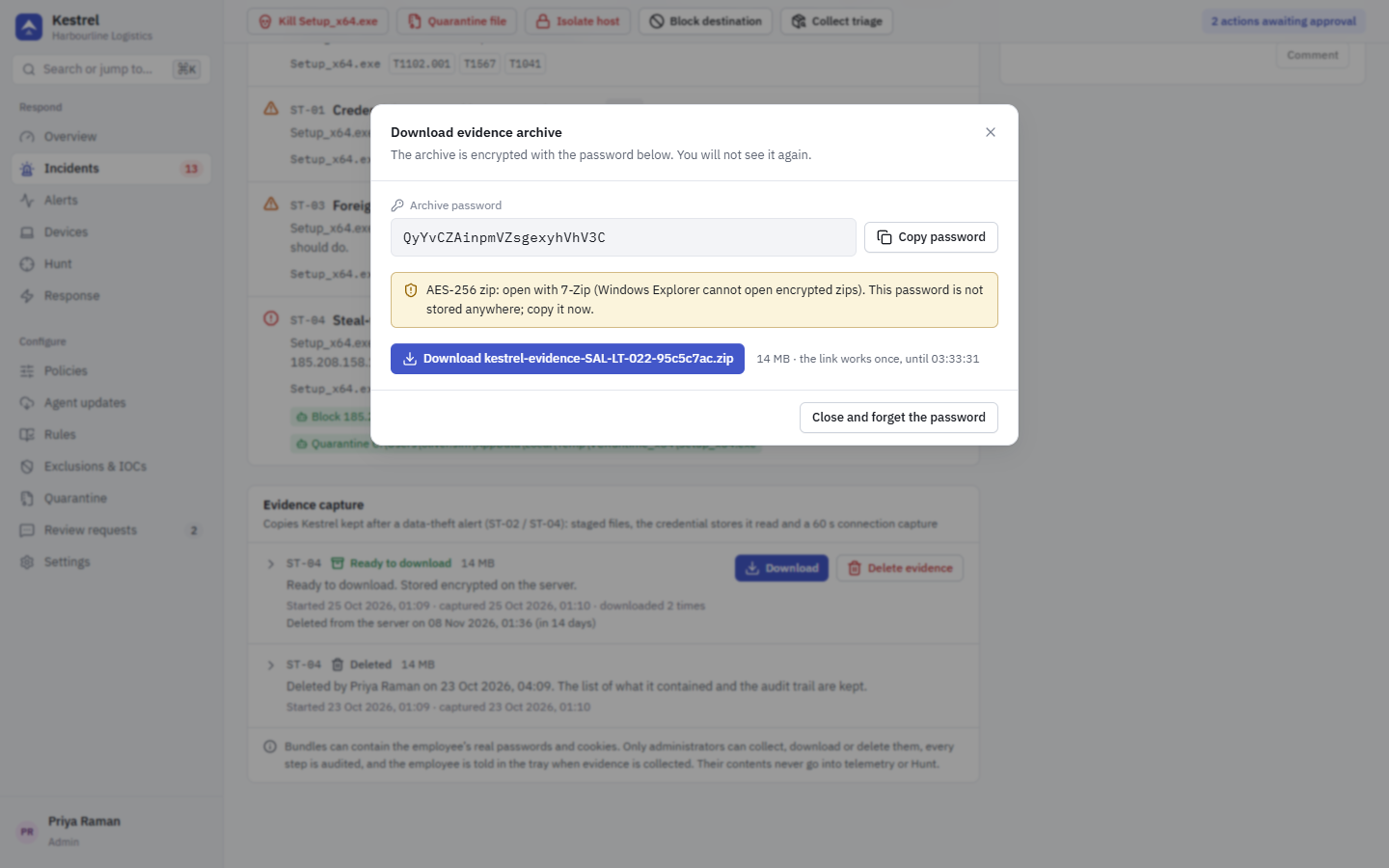
- The archive is an AES-256 encrypted zip. Open it with 7-Zip, WinRAR, WinZip, Keka or
7z x. Windows Explorer cannot open encrypted zips. - The password is generated for this download and is not stored anywhere. Copy it before you close the dialog; closing it forgets the password. If you lose it, start a new download, which gets a new password.
- The download link works once, for the same signed-in session, for 10 minutes. If the bundle was deleted or expired in the meantime, the dialog says "This evidence is no longer stored" and the panel refreshes. A download that is still running stops within about a second when someone deletes the bundle or it expires.
Handle the archive like a password vault: it may contain working credentials. Rotate the exposed secrets as the incident's remediation checklist says, whatever the evidence shows.
Inside the archive
| Entry | What it is |
|---|---|
README.txt | What the archive holds and how to handle it. |
staged/NNNN-<name>.bin | A staged file, with its original name in front of .bin. |
secrets/NNNN.bin | A copy of a credential store, numbered only. |
capture.pcapng | The connection capture. |
manifest.json | The list of contents: which store or file each number is, where it came from, hashes and the reason for anything not copied. |
The file names are not encrypted. The zip's password protects the contents of each file, not the list of names: anyone who gets the zip can see the entry names without the password. That is why credential-store copies are numbered only; manifest.json, whose content is encrypted, says which store each number is.
Staged files are dangerous. They were produced by the suspicious program and can be malware or booby-trapped documents (shortcuts, HTML applications, scripts, macro documents). Kestrel adds .bin to every staged file so a double-click does not open it. Do not rename or open them on your workstation; examine them only on an isolated analysis machine or in a sandbox.
Delete evidence
Delete evidence removes the copy on the server (status Ready to download) or tells the PC to delete its copy (On the PC, Collecting). The list of contents and the audit trail are kept. Deleting cannot be undone.
Reason and authenticator code
Collect, Download and Delete each have an optional Reason (recorded in the audit log) field, up to 200 characters, for example the ticket number.
If your account has two-factor authentication, collecting, downloading and deleting ask for a fresh authenticator code when you have not confirmed one in the last 10 minutes. Enter it and the action continues by itself. One confirmation lasts 10 minutes. Administrators without two-factor authentication are not asked; turning it on for every administrator is recommended (see Settings).
Who can do what
| Action | Privilege |
|---|---|
| See the panel and the list of contents | read (every role) |
| Collect, download, delete | evidence.download (administrators, through *), from an interactive console session only. API tokens are refused even with *. |
Retention
- On the PC: a bundle nobody collected is deleted after the policy's "Keep uncollected bundles on the PC" (default 14 days).
- On the server: a collected bundle is deleted after Settings > Branding, privacy & retention > Evidence bundles (default 14 days, 1 to 365) from the time it was stored.
In both cases the status becomes Expired and the list of contents and audit trail stay. Bundle contents never go into telemetry, ClickHouse or Hunt. See Privacy.