
Response actions
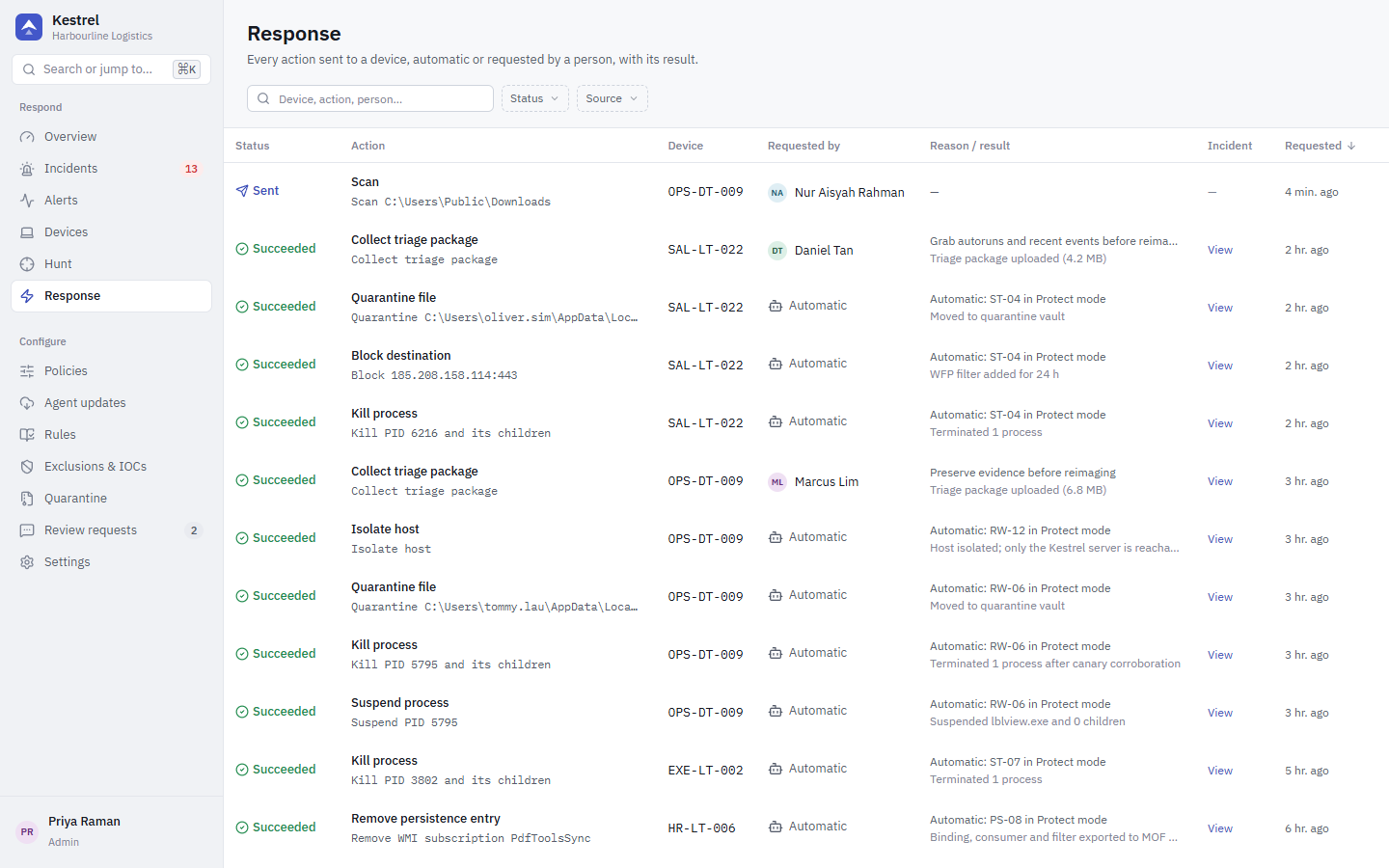
Response actions run on the endpoint. They come from two places:
- Automatic: a rule in Protect mode attaches actions to its alert, and the agent carries them out at once, even offline. These show in the console with no requester.
- Analyst: issued from the device page, the incident page (including checklist approvals) or the API. They are stored first, delivered immediately if the agent is connected, otherwise at its next connection. They expire after 7 days.
Every action ends as succeeded, failed or expired, and appears on the Response page, the device's Actions tab and the incident's Actions tab. Every analyst action is written to the audit log. Commands are idempotent: the agent keeps a ledger of what it already executed.
Actions and privileges
| Action (console label) | What it does | Privilege |
|---|---|---|
| Kill process | Terminates a process, optionally its whole tree. | response.process |
| Suspend process / Resume process | Freezes all threads of a process (NtSuspendProcess) or resumes it. | response.process |
| Quarantine file | Moves a file into the encrypted quarantine vault on the device. | response.file |
| Restore file / Delete quarantined file | Puts a quarantined file back where it was, or deletes it from the vault. Restoring a file also lifts network blocks on it. | response.file |
| Block destination | Blocks outbound traffic to an IP (optionally one port, optionally for one program) through WFP, with an optional lifetime. | response.network |
| Block app network | Blocks all network traffic of one executable through WFP. | response.network |
| Lift network block | Removes Kestrel's network blocks for a program (or one block, or all). Never touches isolation. | response.network |
| Isolate host | Cuts all network traffic except to the Kestrel server (and any IPs you allow). | response.network |
| Release host | Ends isolation. | response.network |
| Scan | YARA-X scan of a path, or of every running program in a user-writable folder. | response.collect |
| Collect triage package | Uploads the process list, recent events and autoruns. | response.collect |
| Re-apply hardening | Re-applies every hardening control the policy asks for and reports drift. | response.collect |
| Remove persistence entry | Removes an autorun (registry value, Startup file, scheduled task, service, WMI subscription) after backing it up in the vault, or restores a Windows default value. | response.persistence (administrators only by default) |
The analyst role has every response privilege except response.persistence. readonly has none.
Safety rules the agent always applies
- Never on protected processes. System processes such as csrss, lsass, services, svchost, explorer and Defender are never killed or suspended. A process counts as protected only at its exact location on the system volume with a valid Microsoft signature, so malware with a look-alike name or path is not shielded.
- Never on itself, PID 0 or PID 4. The console does not offer shell or OS processes as kill targets.
- PID reuse checked. Kill and suspend open the process first and compare its creation time on the same handle, so a reused PID is never touched.
- Quarantine never follows links. Every path component is checked for junctions and symbolic links, files with more than one hard link are refused, and the SHA-256 is checked before any change. Automatic quarantine only acts on images in user-writable folders; server-issued quarantine never touches Microsoft-signed OS files.
- Restore is strict. It writes only to the recorded original path, through a verified parent folder, never into
%SystemRoot%or Program Files. - The Kestrel server is never blocked, by any rule or IOC.
- Persistence removal is allow-listed. Only known autorun locations can be removed, and only exact Windows default values can be written back (for example Winlogon
Userinit, WDigestUseLogonCredential = 0). Kestrel's own service is never touched. Both the server and the agent check the list.
Kill, suspend and suspend on suspicion
For three rules (ST-01, ST-03 and, if you turn it on, ST-12) Protect mode suspends the process first and waits for the suspend window (3 seconds by default, set per policy):
- If a strong rule (ST-02, ST-04, ST-07, ST-16) fires in Protect mode for the process, its parent or a child, the process tree is killed and the image quarantined (and for ST-04 the destination blocked).
- If the window expires and the process is unsigned or invalidly signed, runs from a user-writable folder and was caught by ST-01 or ST-03, it is killed and quarantined.
- Otherwise the process is resumed, so password-manager imports and backup tools only stall briefly.
Quarantine and restore
Quarantined files are encrypted with a per-device AES-256-GCM key protected by machine-scope DPAPI, in a vault folder only SYSTEM and Administrators can open. Manage them on the Quarantine page.
Network blocks
Automatic blocks from ST-02, ST-07 and ST-16 apply to the offending program and stay until an analyst lifts them. Blocks caused by a Block IOC last ioc_block_ttl_secs (24 hours by default) and are lifted when the IOC is deleted.
To undo a false positive, use Lift network block from the device's Actions tab or the incident checklist item "Lift network block for ... (only if it was a false positive)". Restoring a quarantined file also lifts its blocks.
Isolate and release
Isolate host installs persistent WFP filters so the device can reach only the Kestrel server (and the IP addresses you list). DNS to the configured resolvers stays open. The filters survive a reboot. While isolated:
- The agent re-checks the server address and the adapters' DNS servers every minute, so a roaming laptop keeps reaching the server.
- The device shows as
isolated, and the tray tells the employee their network access is limited. - If the server stays unreachable for
isolation_auto_release_hours(72 by default, 0 = never), the agent releases isolation itself and tells the user.
Release host from the device page ends isolation.
Break-glass: release locally
If an isolated host can no longer reach the server, an administrator on the device can release isolation with the device's uninstall token (from Uninstall token > Reveal on the device page):
& 'C:\Program Files\Kestrel\kestrel-agent.exe' release-isolation --token <uninstall token>It removes Kestrel's isolation filters, and the running service does not re-apply them. The token can also be passed in the KESTREL_UNINSTALL_TOKEN environment variable.
API
Analyst actions are POST /api/devices/{id}/actions with {"action": {...}}, for example:
{ "action": { "type": "unblock_network" } }The full list of action types and fields is in docs/contracts.md in the repository.