
Settings
Settings has seven sections. Most need the settings.write privilege to change; the audit log needs audit.read.
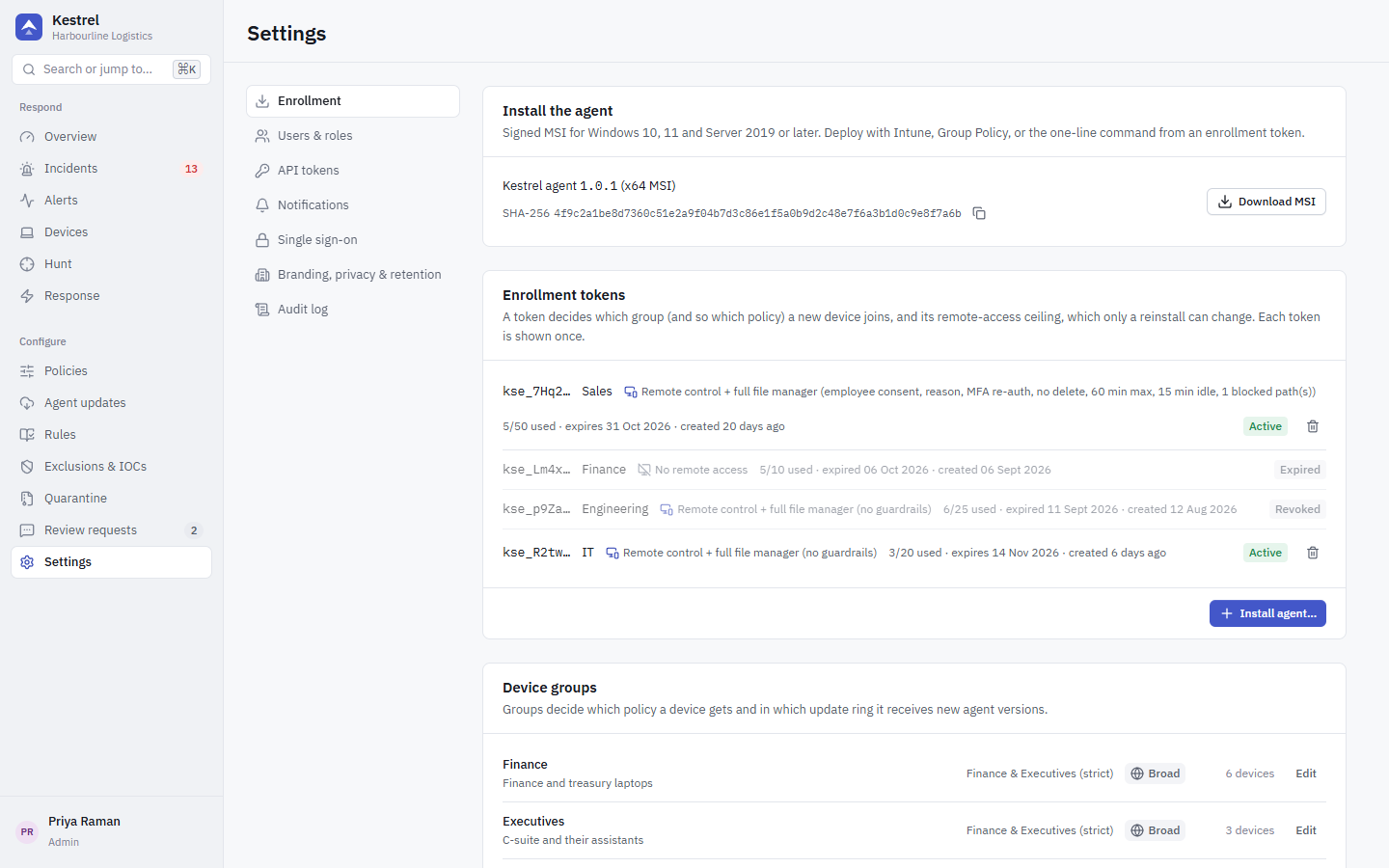
Enrollment
- Install the agent: the install wizard, the MSI the server serves and its SHA-256 (Copy SHA-256). See Enroll devices.
- Enrollment tokens: active tokens with group, expiry and use count. Revoke token stops a token at once.
- Device groups: name, description, the policy the group uses and its update ring (
canary,early,broad,pinned; see Agent updates). New devices join the group named by their enrollment token.
Users and roles
Add users with name, email, role and an initial password. The table shows whether each user has two-factor authentication and whether they sign in with SSO.
Built-in roles:
| Role | Privileges |
|---|---|
admin | everything (*) |
analyst | read, incidents.write, response.process, response.file, response.network, response.collect, exclusions.write, iocs.write |
readonly | read |
Other privileges, held by admin through *:
| Privilege | Allows |
|---|---|
policies.write | Edit policies and groups; create global exclusions |
rules.write | Edit rules and custom Sigma rules |
devices.write | Edit, tag, move and decommission devices; create enrollment tokens; reveal and rotate uninstall tokens |
users.write | Manage users and roles |
settings.write | Change organisation, SSO and notification settings |
audit.read | Read the audit log |
tokens.write | Create and revoke API tokens |
updates.write | Register, promote and halt agent releases; set a group's update ring |
response.persistence | Remove or restore persistence entries as SYSTEM on endpoints |
remote.desktop, remote.files | Remote desktop and remote file manager, from an interactive console session only |
devices.remove | Remove device: uninstall the agent remotely, from an interactive console session only (API tokens are refused) |
evidence.download | Evidence capture: collect evidence bundles from PCs, download them and delete them, from an interactive console session only (API tokens are refused). Admins with two-factor authentication confirm a fresh code (valid 10 minutes) to collect or download. Every role with read sees the bundle status and list of contents. |
API tokens
For SIEM, SOAR and scripts. Give each token a name, only the privileges it needs, and an expiry (30 days, 90 days, 1 year or 2 years). The token is shown once. Send it as:
Authorization: Bearer kst_...API tokens skip CSRF checks, cannot change passwords or MFA (/api/me/*), and are always refused for remote desktop and the remote file manager.
Notifications
Where Kestrel sends new incidents. Each channel has its own minimum severity.
| Channel | Settings |
|---|---|
| SMTP host, port, username, password, from, recipients | |
| Slack | Incoming webhook URL |
| Microsoft Teams | Workflow webhook URL |
| Webhook | URL and a signing secret (requests are signed) |
| Syslog (SIEM) | Host, port, UDP or TCP, CEF or JSON; Allow a private syslog address for an internal collector |
Outbound HTTP (webhooks, Slack, Teams, OIDC) reaches only public addresses unless KESTREL_OUTBOUND_ALLOW_CIDRS allows a private range, and never follows redirects. There is no test-send button yet: save, then watch the channel for the next incident.
Single sign-on and sessions
Single sign-on (OIDC): issuer URL, client ID, client secret, allowed email domains and the role for new SSO users. The page shows the redirect URI to register with your identity provider.
- Accounts are bound by issuer and subject, never by email. A first SSO sign-in creates a new SSO-only user; an existing password account must be linked by an administrator.
- The identity provider must report
email_verified = true, and the domain must be in the allowed list. An empty list lets nobody in. - The default role for new SSO users can never be an administrator role.
Sessions:
- Require two-factor authentication for password sign-ins (SSO users follow their identity provider's policy).
- Sign people out after N minutes of inactivity (15 to 1440).
- Maximum session length in days (1 to 90, default 7).
Two-factor authentication (TOTP)
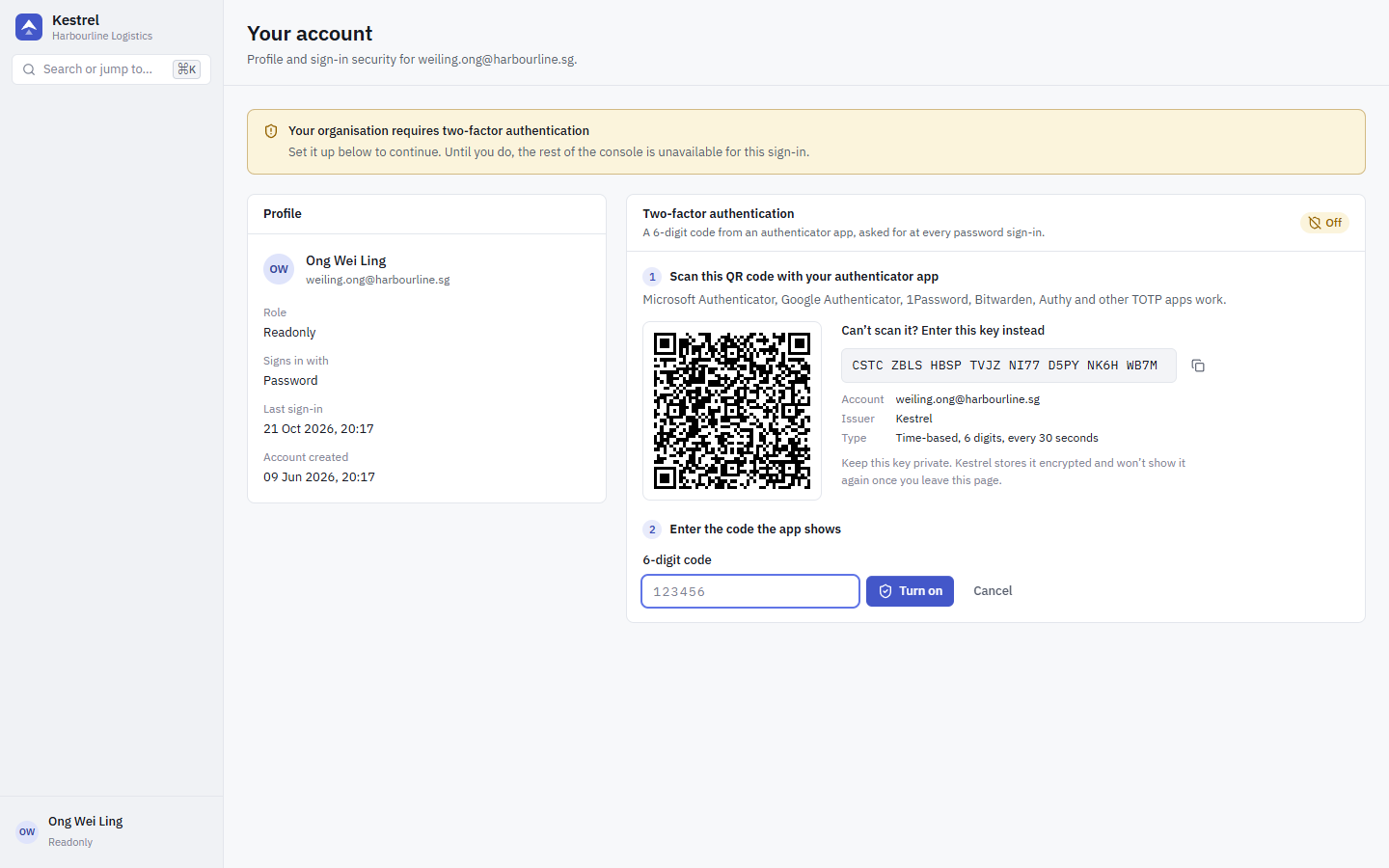
Each user sets up their own authenticator under Account & security in the user menu (bottom left), at /account:
- Click Set up two-factor authentication.
- Scan the QR code with an authenticator app (Microsoft Authenticator, Google Authenticator, 1Password, Bitwarden, Authy and other TOTP apps), or type the key shown next to it.
- Enter the 6-digit code the app shows and click Turn on.
From then on the console asks for a code at every password sign-in. Codes are single use. To turn it off, the user confirms with their password; it cannot be turned off while Require two-factor authentication is on.
When Require two-factor authentication is on, a password user without an authenticator who signs in can only reach the account page until they finish setup. Kestrel does not issue recovery codes: use an authenticator app that backs up its keys. If a user loses their authenticator, an administrator deletes the account and invites the user again.
Enable two-factor authentication for every administrator, especially where remote access is allowed: the Guarded remote-access profile can require a fresh code before each session.
Branding, privacy and retention
- Organisation and branding: organisation name and the default IT contact (name, email, phone).
- Data retention: how long the server keeps each kind of data. Defaults: events 30 days (7 days on the PostgreSQL fallback), alerts 365 days, audit log 730 days. The ClickHouse TTL is changed live.
- Evidence bundles: how long the server keeps a collected evidence bundle, counted from the upload (1 to 365 days, default 14). After that the content is deleted and the bundle shows as Expired; its list of contents and audit trail stay. Bundles nobody collected follow the policy's "Keep uncollected bundles on the PC".
Per-policy branding and the employee notice are in the policy editor.
Audit log
Every administrative action is recorded: sign-ins, policy and rule changes, token creation, response actions, enrollment, uninstall token reveals, hunt queries, and every remote-access session and file operation. Each row is chained to the previous one with an HMAC keyed from the master key, so database access alone cannot rewrite history.
The page verifies the chain when it opens. Run the check again after restoring a backup. The same check is available as GET /api/audit-log/verify, which returns {ok, broken_at, count}.