
Detection rules
Kestrel ships 55 built-in behavioural rules and a 70-rule SigmaHQ pack. This table is taken from the engine's catalog (Engine::catalog(), crates/kestrel-detect/src/catalog.rs and families/). Protect in the Default column marks the safe on day one set; everything else starts in Audit. The console's Rules page shows each rule's full logic, ATT&CK techniques, Protect action, references and known false positives.
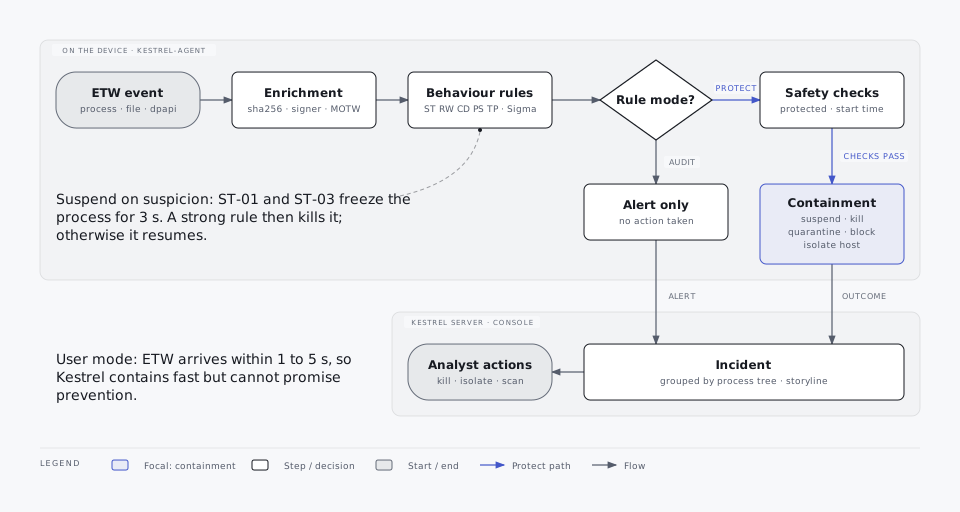
How detection works
- Behaviour, not allow-lists. Rules look at what a process does: which credential store it opened, whether it then connected out, whether it touched LSASS or wrote an autorun. There is no general "never kill this app" list; false positives are fixed per rule, with exclusions or by the rule's own checks of the owning application and signature.
- Per-process correlation. The engine keeps short-lived state per process (secret categories touched, evidence events, DNS answers), which lets rules like ST-02 and ST-04 combine several events and lets the server explain what was at risk.
- One path for every hit. The mode comes from the policy (Off drops the hit). The agent itself and PIDs 0 and 4 are never subjects. An Allow IOC on the file's SHA-256 or signer suppresses all rules. Exclusions are applied. Duplicates are dropped (one alert per rule per process per 10 minutes, except escalations). In Audit the alert carries no actions; in Protect it carries actions, filtered by the response safety rules.
- Low-severity repeats are folded. An Audit alert of severity Low or Info is sent at most once per rule, program (SHA-256, else path) and object (file, host name, target process) per device per 24 hours. Later repeats are counted and the next alert for the same key says how many were folded. Medium and higher alerts, ST-04 and alerts of rules in Protect are never folded.
- Unknown signatures are never trusted. The first start of a new program is held up to 750 ms while it is hashed and its signature checked. Facts that arrive later re-run hash IOCs and the rules that depend on them.
Stealer rules (ST)
| Id | Rule | Severity | Default |
|---|---|---|---|
| ST-01 | Credential-store read by untrusted process | Medium | Audit |
| ST-02 | Smash-and-grab credential collection (3 or more secret categories in 60 s) | Critical | Protect |
| ST-03 | Foreign DPAPI unprotect of browser secrets | High | Audit |
| ST-04 | Steal-then-send (credential read by the process or its process tree, then an external connection within 300 s, or 30 min once 64 KB or more were uploaded) | Critical | Protect |
| ST-05 | Browser debugging abuse (--remote-debugging-* with headless or alternate profile) | High | Audit |
| ST-06 | Local CDP client (non-browser connects to the DevTools port) | High | Audit |
| ST-07 | Browser process tampering (memory access, injection, debugger attach) | Critical | Protect |
| ST-08 | Chrome elevation-service abuse | High | Audit |
| ST-09 | Foreign crypto library load (nss3.dll) | Medium | Audit |
| ST-10 | ClickFix Run/Address-bar artefact (RunMRU, TypedPaths) | High | Audit |
| ST-11 | Paste-and-run process chain | High | Audit |
| ST-12 | Untrusted execution from user paths | Low | Audit |
| ST-13 | .NET LOLBin hollowing | High | Audit |
| ST-14 | Dead-drop / exfil service from non-browser (Telegram, Steam, Discord webhooks and others) | High | Audit |
| ST-15 | Trusted-binary sideload from user path | High | Audit |
| ST-16 | Canary tripwire | Critical | Protect |
ST-01, ST-03 and ST-12 use suspend on suspicion in Protect mode: the process is frozen for the policy's suspend window and killed only if a strong rule (ST-02, ST-04, ST-07, ST-16) confirms the theft, or if it is unsigned and runs from a user-writable folder. ST-16 kills the reader, blocks its network for 24 hours and quarantines it; it isolates the host only when the reader is unsigned and runs from a user-writable folder. A genuine browser or password manager installed under Program Files reading a decoy gets an Audit alert only.
Trust is identity, not name. An application only counts as itself (a browser that owns its stores, the owner of Discord's or Telegram's files, a benign reader such as an antivirus or backup agent, a developer tool, a WAM client) when its signature is valid and made by the publisher's exact signer (no partial match: "Reset Data Systems Ltd" is not ESET), it runs from that publisher's install location (for example Program Files\Google\Chrome\Application or %LOCALAPPDATA%\Google\Chrome\Application for Chrome, %LOCALAPPDATA%\Discord for Discord), and nothing tampered with it. A copy of a genuine chrome.exe in another folder, a stealer signed with a stolen certificate and named chrome.exe or Update.exe, a mock Program Files folder, or a svchost.exe outside System32 is treated like any other program. Only browsers in Kestrel's publisher table (Chrome, Edge and WebView2, Brave, Firefox, Opera, Vivaldi, Yandex, Arc) count as browsers; a less common browser such as LibreWolf, Waterfox or Thorium reading its own profile raises a Low alert, and reading another browser's stores raises ST-01. Another application that owns a store (a wallet, an FTP client) but is not in the table owns it only when installed under Program Files; installed in the user profile, its reads of the store in its own AppData folder are a Low alert, and a following send is a High alert to a named host and the full ST-04 response to an address without a name or a dead-drop service. A browser started by a process that is not a trusted launcher owns only its own vendor's stores and key (a stealer that starts Chrome and injects code into it before it runs is not seen by a user-mode sensor).
Tampering removes every allowance. A process that received a remote thread, a thread-context change, a debugger, or a handle with write or create-thread rights from an untrusted (or itself tampered) process, or that loaded an unsigned DLL from a user-writable folder (or a DLL whose signature is not known yet but whose name is a classic side-loading target such as version.dll), loses owner status and every allowance for its lifetime, Windows binaries included. A stealer hollowed into credwiz.exe, OpenWith.exe or explorer.exe, an Excel with an unsigned XLL, or a Teams with an injected thread reads stores like any other program.
Trusted Windows binaries are only left alone for Windows' own stores (Credential Manager, DPAPI master keys, the WAM token cache, MSAL). A Windows binary reading a browser, wallet, messenger or developer store raises ST-01.
Process trees. ST-02 also fires when one untrusted process tree (up to the first trusted ancestor, such as Explorer or an installed application) collects three kinds of secrets in 60 seconds through two or more processes, for example one esentutl /y child per store. ST-04 links the reader and the sender across the tree: the sender's parent and children, deeper descendants and siblings that read real stores (also after the reader exited), and the Windows BITS service when the reading tree created a BITS upload job (bitsadmin /upload, Start-BitsTransfer -TransferType Upload). Reads followed by an upload of 64 KB or more up to 30 minutes later count too. A single QUIC handshake datagram (UDP 443, at most 1,500 bytes) is not a send.
Paths. A store read through an 8.3 short path (USERDA~1\Default\LOGIND~1) or from a volume shadow copy (\\?\GLOBALROOT\Device\HarddiskVolumeShadowCopy7\Users\...) is the store. Opening a store folder (a wallet extension's folder, ProgramData\Microsoft\Vault, .aws\cli\cache) is enumeration and not counted; every file inside them is.
Own profile key. Electron and WebView2 apps decrypt their own key with the DPAPI description "Chromium". When the sensor saw the process read its own profile's Local State (its --user-data-dir or %APPDATA%\<app>) just before, and nothing foreign was read by it or its process tree, ST-03 is an Info alert and the decrypt is not a credential signal. Without that evidence, a "Chromium" decrypt with no credential store opened by the process or its tree is a High Audit ST-04 (no kill): a stealer must read the store whose key it decrypts, and that read gets the full response.
Developer-tool credential stores (kubeconfig, Docker config.json, AWS credentials and SSO cache, Azure CLI token cache, Google Cloud SDK credentials) are read by many developer tools as part of normal work. When the reader is signed by that store's tool publisher (Docker Inc for Docker and kubeconfig, Amazon for AWS, Microsoft for Azure CLI, Google for Google Cloud, HashiCorp, SUSE and JetBrains for several), installed under Program Files or WindowsApps on the system volume, is not an interpreter, script host or LOLBin, has no script, eval, inspector or remote-debugging argument and was never injected into, ST-01 raises a Low Audit alert and a following ST-04 is Audit only: Low when the connection goes to the publisher's or the provider's endpoint, High when it goes to another host or an address without a name, and the full response when it goes to a dead-drop or exfiltration service. Any other signer is not a developer tool for these stores, Office applications never are, and Microsoft's developer tools are a fixed list (az, azcopy, azd, func, kubectl, kubelogin, Visual Studio, Azure Data Studio, MSBuild, Bicep). Customer-named Azure addresses (storage accounts, web apps, VMs, key vaults, registries) are never a developer-tool or Microsoft service endpoint. Browser, wallet, messenger and Windows credential stores are not covered by this. Interpreters such as python.exe or node.exe are not owners of the AWS, Azure CLI or Google Cloud stores, so their reads raise ST-01. Only the official CLI layouts are owners: the Azure CLI's bundled python.exe under Program Files\Microsoft SDKs\Azure\CLI2 running azure.cli, and the Google Cloud CLI's bundled python.exe running that SDK's gcloud.py.
ST-04 also looks at where the data went. When a validly signed reader outside Temp and Downloads (interpreters included) read only one provider's developer-tool stores (AWS, Azure CLI, Google Cloud SDK or Docker) and the connection goes, by DNS name, to that provider's own service endpoints (for example s3.ap-southeast-1.amazonaws.com, login.microsoftonline.com, oauth2.googleapis.com, registry-1.docker.io), ST-04 is a High Audit alert with no kill and no block. That is normal SDK and CLI use, but it would also fit an attacker using the stolen credentials, so review it. A connection to any other host, to an IP address without a resolved name, an unsigned reader, or a read of any other store (kubeconfig included) gets the full response.
A credential store only counts where the real one lives. Browser, Discord, Bitwarden, 1Password, Windows sign-in (WAM) and other token caches must sit under a user profile's AppData (a profile is <drive>:\Users\<name>, the SYSTEM or a service profile, or a redirected AppData on a share). .aws, .azure, .kube, .docker and .ssh must sit directly in the profile folder. Windows Credential Manager and DPAPI keys sit in a profile's AppData, ProgramData\Microsoft or System32\Microsoft\Protect. A copy inside the profile's Temp folder or inside a nested Users tree (test and replay data such as %TEMP%\.tmpX\sim-fs\C\Users\j.doe) is not a store, and an MSIX app reading its own AppData\Local\Packages\<its package>\LocalCache copy is reading its private data. Portable stores (Steam, Telegram, FTP clients, wallets, KeePass, VPN profiles) still count anywhere outside such fake trees.
The SSH clients ssh, ssh-agent, ssh-add, scp, sftp, ssh-keygen, plink, pageant and git-remote-* own the SSH key store when they run from System32\OpenSSH, Program Files\Git\usr\bin (Git for Windows ships its ssh.exe unsigned), Program Files\OpenSSH or Program Files\PuTTY on the system volume, without ProxyCommand, LocalCommand, KnownHostsCommand, provider options or library and config switches (ssh -I or -F, ssh-add -s, ssh-keygen -D and similar) on the command line, and never after something injected into them. A copy anywhere else still alerts. Options in ~\.ssh\config are not visible to Kestrel.
A Microsoft-signed app installed in the user profile (Visual Studio Code installs to %LOCALAPPDATA%\Programs by default) reading the WAM token cache raises a Low Audit ST-01. Only the exact per-user install paths count (Visual Studio Code, Visual Studio Code Insiders, OneDrive). ST-04 after it is a Low Audit alert only when the connection goes, by DNS name, to a Microsoft sign-in or telemetry endpoint (for example mobile.events.data.microsoft.com, login.microsoftonline.com, default.exp-tas.com), from Microsoft-signed processes that are not interpreters. Services where anyone can own a tenant (SharePoint, OneDrive, Graph, Office, Azure DevOps, *.windows.net, *.azure.com), any other host, an IP without a name, unsigned readers, other signers and interpreters get the full response.
Steam's config\config.vdf (client and library configuration) read by a validly signed native service installed under Program Files, such as NVIDIA's nvcontainer.exe, raises a Low Audit ST-01 and ST-04. Steam Guard files (ssfn*), loginusers.vdf and local.vdf are never covered.
When ST-04 is Audit only because the reads were benign (WAM cache, an Electron app's own safeStorage key, developer-tool stores, Steam config.vdf as above), its severity is Low. A Microsoft-signed Program Files app (Office, OneDrive, Teams) that read the WAM cache and then talks to a Microsoft service (SharePoint, Outlook, Graph, Xbox Live, ...) is Low; another host or an address without a name is High Audit. Visual Studio Code (per-user) signing in to GitHub: github.com is Low, api.github.com is High Audit (the API can also create gists), gist.github.com, uploads.github.com and *.githubusercontent.com get the full response. A send to a dead-drop or exfiltration service after benign reads always gets the full response. For developer-tool stores and Steam config.vdf that holds only when the reader itself, its same-vendor backend or the provider's endpoint is on the other end; another sender stays High. The provider-endpoint case above stays High. ST-04 alerts are never folded.
ST-07 is also raised for a validly signed process that was itself injected into or side-loaded (DeerStealer's renamed file manager in ProgramData). It is not raised for an MSIX app in its WindowsApps folder opening a WebView2 started by another process of its own package (WhatsApp's background process and WhatsApp's WebView2). It is not raised when an application installed under Program Files or WindowsApps opens a WebView2 process it launched (msedgewebview2.exe whose parent, or grandparent through the WebView2 browser process, is the opener). This covers handle opens only, never thread injection or debugger attach. A LOLBin or script host as the opener, an injected opener, a WebView2 under remote control or pointed at a real browser profile, a WebView2 opened by another program or launched by a tool in a user folder, and real browsers keep ST-07.
ST-12 alerts once per program (SHA-256, else path and size) per device per 7 days, the first time it runs; later runs are folded into that alert. The same file running from a riskier folder (Temp, Downloads or removable media after AppData) alerts again. A new unsigned program in Downloads, Temp or AppData still alerts on its first run. With ST-12 in Protect, a program is suspended and judged on each run until the same file (by SHA-256) has been suspended and resumed three times within 7 days; then it is folded like in Audit. A new build (new hash) is judged again.
ST-05 is a Low Audit alert without actions for test automation: a browser started with remote debugging and a fresh Playwright or Puppeteer temporary profile (%TEMP%\playwright_*, %TEMP%\puppeteer_dev_*), or the framework's own browser build without a profile, when the launching process tree read no browser store in the last 10 minutes. Remote debugging on a real browser profile keeps High and the kill.
ST-08 is not raised when a genuine browser installer (Application\<version>\Installer\setup.exe) or updater (BraveUpdate, GoogleUpdate, MicrosoftEdgeUpdate) ran in the last 5 minutes and nothing asked to kill the browser: that is a browser update. Internet Download Manager (signed Tonec Inc.) reading browser cookie and password stores, and the Claude desktop app (signed Anthropic, PBC) reading a browser's Local State, are benign browser integrations.
ST-14 lookups made by WSL's service (Program Files\WSL\wslservice.exe, Microsoft-signed) are Low Audit alerts: WSL answers DNS for Linux processes, so the alert says the name was looked up on behalf of a process inside WSL.
When ST-04 sees the connection come from the reader's parent, and that parent is validly signed under Program Files by the same signer as the reader (for example Docker Desktop's com.docker.backend.exe), only the reader is killed: the parent, its process tree and the destination are left alone. A validly signed sender installed under Program Files gets a destination block for its own image, not for the whole host, so a shared CDN address is not cut for every program.
Ransomware rules (RW)
| Id | Rule | Severity | Default |
|---|---|---|---|
| RW-01 | Shadow copy / backup catalog deletion | Critical | Protect |
| RW-02 | Boot recovery disabled | Critical | Protect |
| RW-03 | Safe-mode boot staging | Critical | Protect |
| RW-04 | Event log cleared or shrunk | Medium | Audit |
| RW-05 | Service / process kill spree | High | Protect |
| RW-06 | Mass file encryption behaviour | Critical | Protect |
| RW-07 | Ransomware canary tampered | Critical | Protect |
| RW-08 | Ransom-note fan-out | Critical | Protect |
| RW-12 | Ransomware kill-chain correlation | Critical | Protect |
RW-06 counts only files that existed before: files the same process created in the sensor window are left out, so a compiler that writes temporary files and renames them to .rlib is not encryption. Extension changes to a compiler output (.rlib, .rmeta, .o, .obj, .pdb, ...) and overwrites are not counted when every sample path of the summary lies in a build folder (target, deps, obj, bin, build, out, debug, release, ...) and none is a user document. Writing an encrypted copy to a temporary file and renaming it over the original (same extension) counts as rewriting the original, and slow encryption in small bursts (for example 11 files every 30 seconds) is added up per process over 5 minutes. RW-08 needs a ransom note: a name with an extension (the sensor cannot tell a new folder from a new file), never a build artefact such as .a, .o, .obj, .rlib, .rmeta, .d, .pdb, .lib or .exp (.tmp only with a note-like name), and a text or document extension (.txt, .html, .htm, .hta, .rtf, .url) or a note-like name (readme, decrypt, restore, recover, how_to, help, instructions, ransom, !!!). The response (5 folders, note extension and note-like name) is unchanged; .md files and images with a note-like name count only for the alert-only check of 20 or more folders, so README.md written by npm install into many folders is never killed.
Credential dumping rules (CD)
| Id | Rule | Severity | Default |
|---|---|---|---|
| CD-01 | LSASS memory dump via comsvcs MiniDump | Critical | Protect |
| CD-02 | Known LSASS dumping tool | Critical | Protect |
| CD-03 | Suspicious LSASS handle request | High | Audit |
| CD-04 | LSASS handle followed by a dump file | Critical | Protect |
| CD-05 | Debug library dump helper reading LSASS | Critical | Protect |
| CD-06 | Blocked LSASS access attempt | High | Audit |
| CD-07 | LSASS dump preparation via SilentProcessExit / IFEO | Critical | Protect |
| CD-08 | LSASS dump via Windows Error Reporting | Critical | Protect |
| CD-09 | Malicious LSA security package | High | Audit |
| CD-10 | Credential hive save or copy | Critical | Protect |
| CD-11 | NTDS.dit extraction | High | Audit |
| CD-12 | WDigest cleartext credential downgrade | High | Protect |
| CD-13 | LSA protection / Credential Guard tamper | High | Audit |
CD-10 and CD-11 also cover wbadmin start backup -include: lists that name NTDS.dit (CD-11) or the SAM / SECURITY / SYSTEM hives (CD-10), and ntdsutil install-from-media (ifm / create full). CD-02 needs a dump switch together with LSASS as the target argument; a text search such as grep -n lsass is not a dump. CD-13 is Low for NordVPN installing its own drivers at their exact Program Files paths. A refused LSASS open by the genuine Roblox client (signed Roblox Corporation, in its Roblox\Versions\version-* folder) with its anti-cheat's usual rights is a Low Audit CD-06.
CD-06 is a Low Audit alert when a validly signed native service or updater installed under Program Files asked LSASS only for read or query rights and Windows refused (NVIDIA's nvcontainer.exe and BraveUpdate.exe do this with 0x410). Unsigned or user-folder openers, requests with write, thread or handle-duplication rights, and successful opens keep their severity.
Persistence rules (PS)
| Id | Rule | Severity | Default |
|---|---|---|---|
| PS-01 | Run key to untrusted payload | Medium | Audit |
| PS-02 | Autorun via script host or LOLBin | High | Protect |
| PS-03 | Startup-folder drop | Medium | Protect |
| PS-04 | Startup folder redirection | High | Audit |
| PS-05 | Scheduled task with untrusted action | Medium | Audit |
| PS-07 | Suspicious service install | High | Protect |
| PS-08 | WMI permanent event subscription | Critical | Protect |
| PS-09 | IFEO / SilentProcessExit hijack | High | Protect |
| PS-10 | Winlogon / AppInit / AppCert / BootExecute change | Critical | Protect |
| PS-11 | COM hijack in user hive | Medium | Audit |
| PS-15 | Persistence rollback | High | Protect |
Persistence rules in Protect remove the autorun after backing up the original in the quarantine vault. They act on the writing process only when Kestrel knows exactly which process wrote it; when the writer is inferred, the alert says so and no process is touched.
Tamper rules (TP)
| Id | Rule | Severity | Default |
|---|---|---|---|
| TP-01 | Telemetry session tampering | Critical | Audit |
| TP-02 | WFP filter tampering (Low when Windows Firewall / BFE refreshes its own default filters) | Critical | Audit |
| TP-03 | AMSI tampering | Critical | Audit |
| TP-04 | Agent service or file tampering | Critical | Audit |
| TP-05 | Telemetry loss | High | Audit |
| TP-06 | Protection turned off on the device | Medium (High when completely off) | Audit |
Exclusions never apply to TP rules. The agent's watchdog restarts stopped ETW sessions.
TP-06 is raised by the agent itself, never by an event: when someone turns protection off with the tray switch and the uninstall token (Medium for detection only, High for completely off), at Info level when protection comes back on or a policy change shortens the turn-off, and when a wrong uninstall token is entered (Medium, High when the switch locks). It never acts. See Employee tray app and Policies.
Other rule ids
| Id | Source |
|---|---|
IOC-* | Indicator hits (hash, IP, domain, URL, certificate). |
SIG-<uuid8> | SigmaHQ pack rules (70, Audit by default, DRL 1.1 with authors shown) and your custom Sigma rules. |
TP-SRV-HEARTBEAT | Server: more than 3 missed heartbeats on a live stream. |
TP-SRV-SEQ-RESET | Server: outbox sequence went backwards (state wiped or cloned). |
TP-SRV-OUTBOX-RESET | Server: the agent started a new outbox. |
TP-SRV-EVENTS-LOST | Server: more than 500 ETW events lost between heartbeats. |
TP-SRV-ETW | Server: the agent reports its ETW session down. |
TP-SRV-PAUSE-OVERDUE | Server: the agent still reports protection turned off 10 minutes after the chosen end time. |
TP-SRV-DUP-ENROLL | Server: a new enrollment reuses the hardware UUID of a recently active device. |
False positives
- Each rule lists known false positives on the Rules page.
- Fix a false positive with the narrowest exclusion that works: SHA-256 or valid signer first, a path glob only when needed, scoped to the one rule. Exclude... on an alert previews what an exclusion would hide.
- Approving an employee's review request creates a SHA-256 or signer exclusion for that rule only, expiring after 90 days.
- A program blocked by mistake: Lift network block, and Restore it from quarantine.
Rollout advice
- Start with the defaults: the safe on day one rules in Protect, everything else in Audit.
- Leave Audit rules running for about two weeks on a pilot group. Review the Alerts page and add exclusions for false positives.
- Move rules to Protect one by one, per policy, starting with a small group.
- Turn hardening on in Audit first to see which devices drift, then Enforce. Test LSA protection and the AppLocker controls on a few devices before the fleet.
- Keep the SigmaHQ pack in Audit unless a rule has proven quiet in your environment.